How to use Automated Agents Monitor
Automated Agents Monitor navigation.
The Automated Agents Monitor has the following parts:
- Outline
- Menu and toolbar
- Detail list.
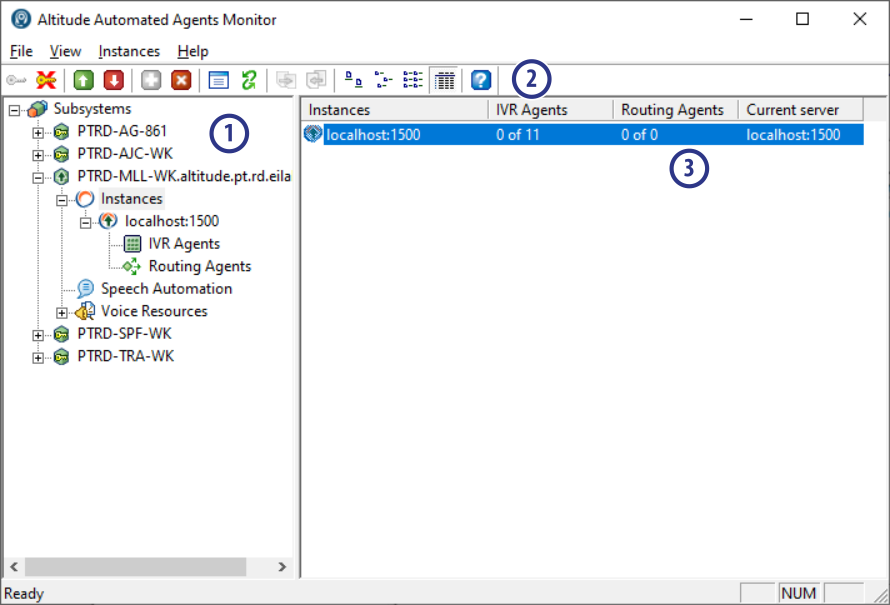
Outline
Displays a logical view of the components, configurations, and activities of the Automated Agents Monitor. The most important icons are the following:
 Subsystems: Represents the monitored Automated Agents subsystems. The icon indicates the state of each subsystem as follows:
 The subsystem is running, but the user is not logged in.
 The subsystem is running and the user is logged in.
 The subsystem is not running.
 Instances: Represents the Altitude uCI Servers in the selected subsystem. The icon indicates the state of each Altitude uCI Server as follows:
 The Altitude uCI Server is online.
 The Altitude uCI Server is offline.
 IVR agents: Represents the IVR agents in the selected Altitude uCI Server.
 Routing agents: Represents the routing agents in the selected Altitude uCI Server.
 Profiles: Represents voice resources profiles in the selected subsystem.
Menu and toolbar
Commands that apply to the entity selected in the outline. The following commands are especially useful:
 Subsystem > Login: Logs in to an Altitude uCI Server in the selected subsystem.
 ... > Boot: Boots the selected IVR or routing agent. Use the command Instances > Boot all agents to boot all agents of the selected Altitude uCI Server simultaneously.
 ... > Properties: Displays the properties dialog for the selected item in the Outline.
 View > Details: Shows detailed information in the Detail list.
 Subsystem > Export configuration: Backs up the selected subsystem configuration by exporting a XML configuration file.
 Subsystem > Import configuration: Restores a subsystem configuration by importing a XML configuration file.
Detail list
Shows the components of the entity selected in the outline. The following lists display useful detailed information:
 Subsystems: Displays the hostname and the IP address of the subsystem, the number of working IVR and routing agents, and the available disk space.
 Instances: Displays the hostname of the Altitude uCI Server, the number of logged and ready IVR and routing agents, and the hostname of the current Altitude uCI Server, which is different from the Instance when a backup Altitude uCI Server is being used.
- IVR agents: Displays the IVR agents in the Altitude uCI Server and the state of each IVR agent.
- Routing agents: Displays the routing agents in the Altitude uCI Server and the state of each routing agent.