Microsoft Teams integration
The integration of Microsoft Teams with Altitude is an evolution of the integration with Microsoft Skype for Business.
To integrate with Microsoft Teams, you need:
- An account in the Microsoft Teams Administration Center.
- An SBC.
- Altitude vBox WebRTC.
- The Connector for Microsoft Teams.
Constraints and limitations
- The current Microsoft Graph API does not allow changing a Microsoft Teams user presence.
- Direct calls to a Microsoft Teams user are only detected when the Microsoft Teams user presence changes to Busy-In-A-Call.
- The answer, hold, and retrieve operations must be done at the Microsoft Teams user interface.
- When a hold call operation is executed at the Microsoft Teams user interface, the call is held and immediately retrieved, because the call becomes connected with the Music Play Server at the Microsoft Teams server.
- There are behavior differences when using Teams at Windows, Android or iOS.
- Extend to alternate is not supported.
- Manual operations (with the answer, hold and retrieve) done directly at the Microsoft Teams client interface (for example, extend, transfer, conference, etc.) are not supported.
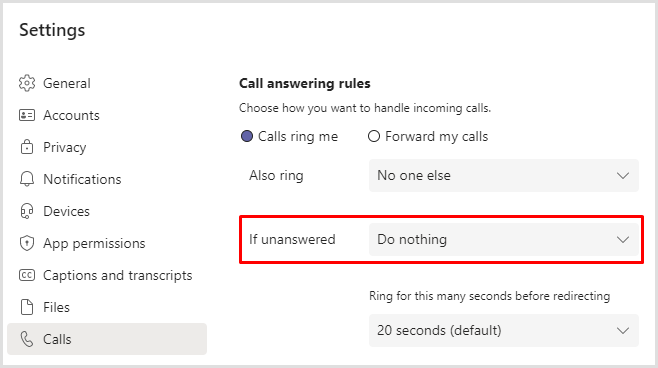
- A Microsoft Teams user should avoid forwarding unanswered calls to voicemail, since call forward is not supported, and the telephony gateway is led to believe that the Microsoft Teams user answered the call. To remove forwarding calls, in the Microsoft Teams interface, select the option Settings, and configure as follows: