Actions reference
Reference of the actions that you can use in buttons, or when starting and ending a script.
Assign
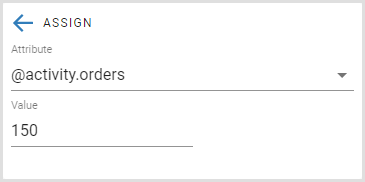
Select the action Assign to assign a variable. You can have multiple Assign actions in the same element.
To assign a variable, you must configure the following properties:
- Attribute: Enter the name of the attribute, or select an attribute from the list.
- Value: Enter the value of the attribute.
Call Web service
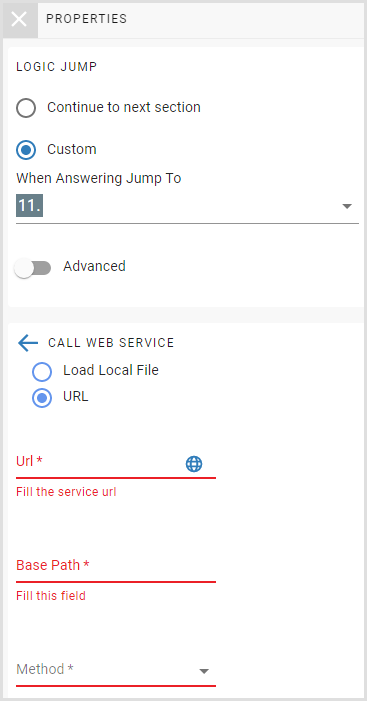
Select the action Call Web Service to execute a method of a web service.
To call a web service, you must configure the following properties:
- Location: Select if the web service definition is in a local file or accessible through a URL.
Important
The integration with web services only supports REST web services, defined either by a file or a URL.
- Url: The URL of the web service swagger file. For example, https://petstore.swagger.io/v2/swagger.json.
- Base Path: The base path of the URL. For example, https://petstore.swagger.io/v2
- Method: The method to invoke.
Attention
If the web service returns an exception, the error is logged on the application trace file, the runtime continues, and the outputs are set to empty.
- Inputs: The inputs to invoke the web service method.
- Outputs: The outputs of the web service method. The outputs can be a simple type or an object, where each property of that object generates one attribute to return.
Restriction
You cannot assign campaign or built-in attributes to outputs.
Discard script
The action Discard script discards the current script session. All data changed in the session is not recorded into the Altitude uCI Server database.
End script
The action End script ends the current script session. All data changed in the session is recorded into the Altitude uCI Server database.
Restart script
The action Restart script ends the current script session, and starts a new script session. All data changed in the session that ends is recorded into the Altitude uCI Server database.