How to customize the customer web chat control
Customize the web chat control that the customers use to interact with a bot or an agent.
The following customizations are based on the file customWebChat.html, located in the sub-folder WebChat of a custom bot. The file customWebChat.html retrieves customer information, starts the chat session, and sends the information to the contact center.-
Build the URL parameters.
In the file customWebChat.html, check the following function to build the URL parameters to send to the contact center. The function configures the following predefined parameters:
- agentName
- campaignName
- contactProfileUniqueId
- directoryName
- entryPoint
- handicap
- origin
- priority
- skillProfileName
- skills
// the following custom events demonstrate how to pass routing data to Altitude interaction initialization// https://docs.microsoft.com/en-us/bot-framework/nodejs/bot-builder-nodejs-backchanneldirectLine.activity$.filter(function (activity) {return activity.type === "event";}).subscribe(function (activity) {if (activity.name === "serverInteractionDataRequest") {// value = { entryPoint: "aa6edc2a-f501-f84a-6528-ee5a5eca72ff", agentName: "agent0", directoryName: "directory0", contactProfileUniqueId: "uniqueId0", attributes: [{ name: "attribute0", value: "value0" }], priority: 1, handicap: 0, skillProfileName: "skillProfile0", skills: [{ name: "skillName0", level: 7, weight: 0.2 }] };let value = {};if (params["entryPoint"] !== undefined) {value.entryPoint = params["entryPoint"];}if (params["agentName"] !== undefined) {value.agentName = params["agentName"];}if (params["directoryName"] !== undefined) {value.directoryName = params["directoryName"];}if (params["contactProfileUniqueId"] !== undefined) {value.contactProfileUniqueId = params["contactProfileUniqueId"];}if (params["attributes"] !== undefined) {value.attributes = JSON.parse(params["attributes"]);}if (params["priority"] !== undefined) {value.priority = params["priority"];}if (params["handicap"] !== undefined) {value.handicap = params["handicap"];}if (params["skillProfileName"] !== undefined) {value.skillProfileName = params["skillProfileName"];}if (params["skills"] !== undefined) {value.skills = JSON.parse(params["skills"]);}if (params["email"] !== undefined) {value.attributes = value.attributes || [];value.attributes.push({ name: "email", value: params["email"] });}if (channelAccountId !== undefined) {value.attributes = value.attributes || [];value.attributes.push({ name: "channelAccountId", value: params["channelAccountId"] });}if (channelAccountName !== undefined) {value.attributes = value.attributes || [];value.attributes.push({ name: "channelAccountName", value: params["channelAccountName"] });}if (params["origin"] !== undefined) {value.attributes = value.attributes || [];value.attributes.push({ name: "origin", value: params["origin"] });}directLine.postActivity({type: "event",name: "serverInteractionDataResponse",from: user,value: value}).subscribe(function (id) {console.log("serverInteractionDataResponse id = ", id);});} else if (activity.name === "agentConversationAddedEvent") {if (params["enableOnConnected"] === "true") {enableWebChat();}if (params["postActivityToAgent"] !== undefined && !postActivityToAgentProcessed) {postActivityToAgentProcessed = true;directLine.postActivity({type: "event",name: "postActivityToAgent",from: user,value: JSON.parse(params["postActivityToAgent"])}).subscribe(function (id) {console.log("postActivityToAgent id = ", id);});}} else if (activity.name === "interactionEndedEvent") {if (params["disableOnEnd"] === "true") {disableWebChat();directLine.end();}}}); -
Send additional parameters.
You can send additional parameters to the web chat control, using the attribute attributes, which is an array of parameters in JSON format.
For example, to send an attribute named attribute0 with the value value0, you must:
- Create a JSON array with the attributes to send. For example, [{ "name": "attribute0", "value": "value0" }].
- Encode the JSON string to a URL format.
Tip
For example, you can use https://www.urlencoder.org/ to encode the JSON string.
- Send the encoded string as a parameter of the URL.
To remove the attachment button from the customer web chat, specify the styleOptions query parameter as follows: styleOptions = {"hideUploadButton”:true}
Remember
Encode the JSON string to a URL format.
-
Configure the agent script.
In Script Developer, configure the agent script to receive the parameters that the customer web chat control sends.
-
Define the parameters of the customer web chat control as transferred attributes.
Define the parameters of the customer web chat control in Business Data > Transferred.
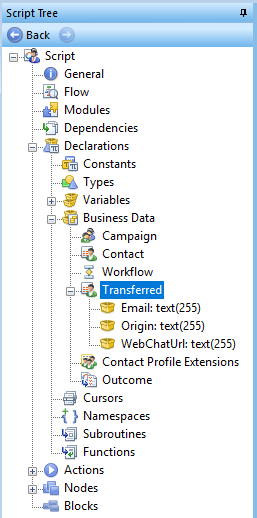
- Use the sample ASL script provided in the installation of the Altitude Bot Connector to send other messages to the customer from the agent script.
- Validate the script.
- Publish the script to the Altitude uCI Server.
- Configure the agent campaign to use the published script.
-
Define the parameters of the customer web chat control as transferred attributes.
Define the parameters of the customer web chat control in Business Data > Transferred.