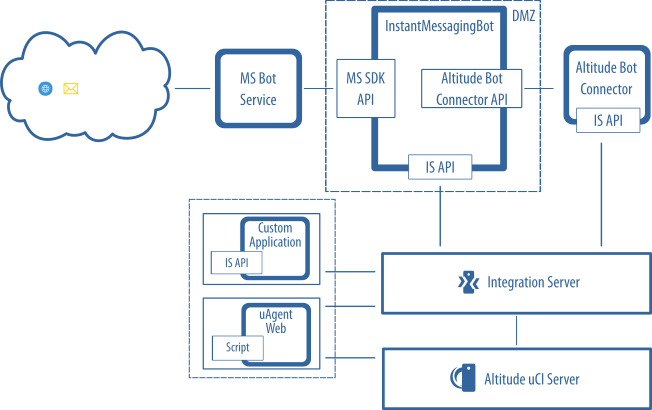
Instant messaging architecture using MS Bot Framework
Architecture for handling instant messaging interactions using the Altitude Bot Connector and the Microsoft Bot Framework.
An Altitude installation for implementing an instant messaging solution has the following components and connections:
- Customers interact with the contact center through the InstantMessagingBot using media channels. For example, Skype, Microsoft Teams, Slack, or Facebook Messenger. The InstantMessagingBot must be registered in Microsoft Azure, and can run on the customer site or in a private cloud.
- The MS Bot Service receives the customer interaction.
- The InstantMessagingBot connects through the MS SDK API to the MS Bot Service.
- The InstantMessagingBot uses the Integration Server API (IS API) to connect to the Altitude uCI Server, and the Altitude Bot Connector API to connect to the Altitude Bot Connector.
- The Altitude Bot Connector delivers the interactions to a human agents campaign, and registers the customer interactions in the Altitude uCI Server.
- The human agents use an ASL script or a different application to handle the instant messaging conversation with the customer.
|
Note You need to install the Altitude Bot Connector to ensure the InstantMessagingBot can receive interactions, and agents can handle interactions in uAgent with a web chat control. |