How to play a message
The example shows how to build a flow in Xperience Routing that plays a message.
- In the Xperience Routing editor, create a new flow.
- Add blocks.
- Add blocks Start and End.
- Add block Play File.
- Connect the blocks.

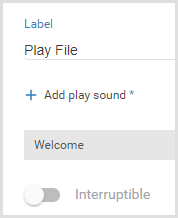
- Select the block Play File and configure the block properties.
Remember
The Welcome message must exist in the telephony switch, and you must correctly configure the audio resources folder in Xperience Routing.
- Publish the flow in the Altitude uCI Server.
- Associate the generated IVR script with a campaign.
How does the example work
- The IVR campaign receives a call.
- The IVR script runs and plays the Welcome message.
|
Note The IVR script does not hang up the phone call. |