Example 7 - Big campaign with teams
The example suggests roles and permissions for the agents and team leaders of a campaign with 20 teams.
A contact center runs the campaign Support. The agents working in the campaign are organized in 20 teams. Each team has 5 agents and a team leader. The users of the first two teams of the contact center are as follows:
- TL1: Team leader of Team1.
- TL2: Team leader of Team2.
- Ag1 to Ag5: 5 agents that belong to Team1.
- Ag6 to Ag10: 5 agents that belong to Team2.
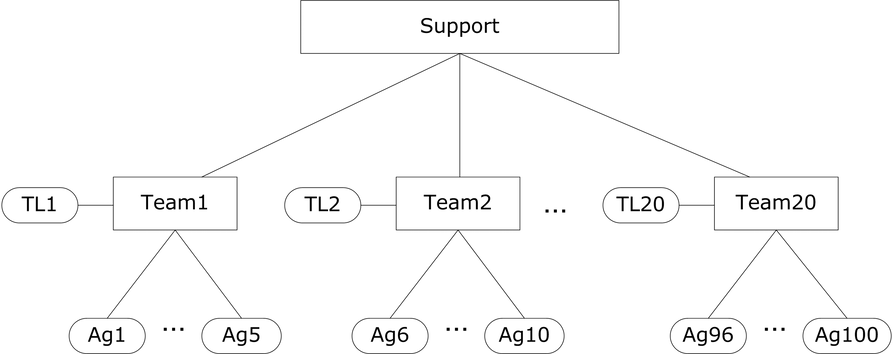
The tables below display the roles and corresponding permissions for the agents and team leaders of the first two teams.
|
Role |
Users |
|---|---|
|
Team Leader A |
TL1 |
|
Team Leader B |
TL2 |
|
Agent |
Ag1 to Ag100 |
Team Leader A
The table below displays the most relevant permissions of the role Team Leader A.
|
Base permissions |
Specific permissions |
Read |
Write |
State change |
Workforce management |
|---|---|---|---|---|---|
|
Agent |
|
No |
No |
No |
No |
|
|
Ag1 |
Yes |
|
|
|
|
|
Ag2 |
Yes |
|
|
|
|
|
Ag3 |
Yes |
|
|
|
|
|
Ag4 |
Yes |
|
|
|
|
|
Ag5 |
Yes |
|
|
|
|
|
TL1 |
Yes |
|
|
|
|
Campaign |
|
No |
No |
No |
No |
|
|
Support |
Yes |
|
|
|
|
Team |
|
No |
No |
No |
No |
|
|
Team1 |
Yes |
|
Yes |
|
Team Leader B
The table below displays the most relevant permissions of the role Team Leader B.
|
Base permissions |
Specific permissions |
Read |
Write |
State change |
Workforce management |
|---|---|---|---|---|---|
|
Agent |
|
No |
No |
No |
No |
|
|
Ag6 |
Yes |
|
|
|
|
|
Ag7 |
Yes |
|
|
|
|
|
Ag8 |
Yes |
|
|
|
|
|
Ag9 |
Yes |
|
|
|
|
|
Ag10 |
Yes |
|
|
|
|
|
TL2 |
Yes |
|
|
|
|
Campaign |
|
No |
No |
No |
No |
|
|
Support |
Yes |
|
|
|
|
Team |
|
No |
No |
No |
No |
|
|
Team2 |
Yes |
|
Yes |
|
Agent
The table below displays the most relevant permissions of the role Agent.
|
Base permissions |
Specific permissions |
Read |
Write |
State change |
Workforce management |
|---|---|---|---|---|---|
|
Agent |
|
Yes |
No |
No |
No |
|
Campaign |
|
Yes |
No |
No |
No |
|
Team |
|
Yes |
No |
No |
No |