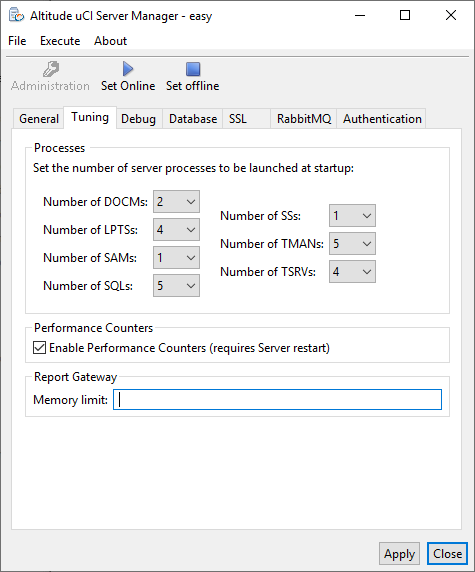
Altitude uCI Server Manager, tab Tuning
Configure the number of Altitude uCI Server processes.
Processes
|
Important Changing the number of Altitude uCI Server processes requires a restart of the Altitude uCI Server. |
- Number of DOCMs: Number of processes that store, compress, and uncompress emails.
- Number of LPTSs: Number of processes that perform asynchronous operations, such as deleting contacts and campaigns.
- Number of SAMs: Number of processes that handle requests from uAgent to divide the workload with the AM process. SAM (security agent manager) processes communicate with the AM (agent manager) process.
- Number of SQLs: Number of processes that handle SQL statements in the agent campaign scripts.
- Number of SSs: Number of processes that handle connections between the Altitude uCI Server and Management Portal.
- Number of TMANs: Number of processes that handle SQL statements generated by the Altitude uCI Server. The TMAN (transaction manager) processes perform most of the Altitude uCI Server database operations.
- Number of TSRVs: Number of processes that compress trace files. Used only if the TSRV are in use.
Performance Counters
- Enable performance counters: Select the check box to enable Windows performance counters for the Altitude uCI Server and Management Portal.
Important
The option Enable performance counters requires a restart of the Altitude uCI Server.
Report gateway
- Memory limit: The private working set limit, in MB, for the reportgw process, when converting reports to Excel. Reports that exceed the limit will fail. An empty value or 0 disables the limit. The default value is empty.