Reporting database concepts
The Reporting database contains information from the Altitude uCI Server database. You can use the Reporting database tables to fetch information for your reports.
The Reporting database has the following components:
- A database in a database engine
- A Windows service.
The Reporting database Windows service periodically reads data from the Altitude uCI Server database and writes data to the Reporting database, allowing customers to use existing applications that are dependent on direct database access.
The Reporting database architecture is the following:
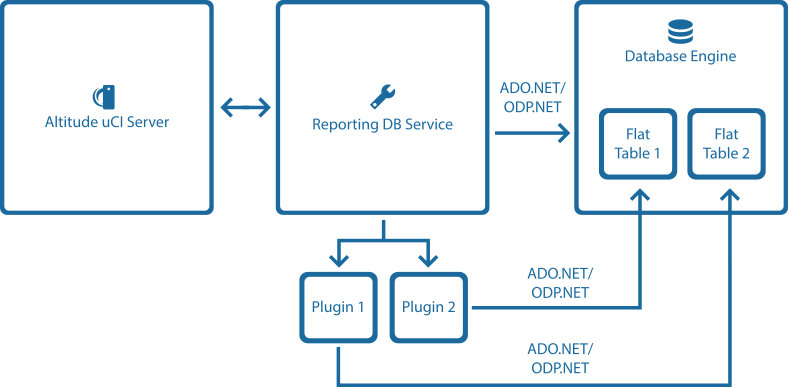
The Reporting database Windows service fetches historical data from the Altitude uCI Server database and populates the data in flat tables in the Reporting database.
The Reporting database Windows service uses plugins to fetch and write data to the databases. Each plugin is responsible for reading data from the Altitude uCI Server database and writing data to the specific flat tables in the Reporting database.
In a multi-instance situation, several plugins can run at the same time except when connected to the same Altitude uCI Server. In that case, each plugin runs isolated and synchronously, meaning that no two plugins will be running at the same time in the same Altitude uCI Server.
The Reporting database uses ADO.NET to connect to a SQL Server Database, and uses the Oracle Data Provider for .NET(ODP.NET) Managed Driver to connect to an Oracle Database. The ODP.NET Managed Driver provides ADO.NET data access to the Oracle database and does not require Oracle client to be installed.
Data extraction
You can configure the Reporting database Windows service to extract information:
- At regular intervals
- Daily.
Regular extractions and daily extractions do not run in parallel, to avoid unnecessary load in the Altitude uCI Server. At the time of a data extraction, the Reporting database Windows service invokes each plugin and provides the connections to the Altitude uCI Server database and the Reporting database.
|
Attention Due to information that is no longer available or is not compatible, it is not possible to create exact replicas of tables that existed on Altitude uCI 7. Customers have to adapt currently working applications that depend directly on Altitude uCI 7 database access. |
If you install the Altitude Reporting database application, you can also import historical information into the Reporting database from the starting date that you specify in the setup panel until now.
When the Reporting database installation finishes and the service starts running, the Reporting database starts importing historical data only in one of the following situations:
- the logging table rdb_service_exec_log does not exist.
- the logging table rdb_service_exec_log exists and does not have data.
You can also import an interval of historical information by executing the command RDB.WindowsService.exe from the command line in the installation folder of the Reporting database.
When the Altitude Reporting database application starts, the Reporting database starts importing historical data. This process can take a long time depending on the volume of data in the Altitude uCI Server database and also on the interval selected.
To see how the progress of the import process, you can check the Reporting database logs (RDB.*) in the Reporting database log folder. You can also verify that the historical data is in the Reporting database tables by checking:
- the interaction activity flat tables (flat_int_*)
- the contact tables (contacts_*)
- the agent activity flat tables (flat_agent_login and flat_agent_cpg_operations).
The database table rdb_service_exec_log contains information regarding the execution of interval and daily extractions. For example, the table contains the start and end time of the execution, the plugin that was executed, the number of database rows inserted and if an exception occurred during the execution. The following table displays column names and details:
|
Name |
Details |
|---|---|
|
execution_id |
Unique Id that identifies an execution. |
|
method |
Either DailyExecution or IntervalExecution. |
|
start_time |
The start time of the execution. |
|
end_time |
The end time of the execution. |
|
start_time_interval |
The start time of the interval that was considered during the execution. For example, if the periodic extraction interval is (ReportingInterval) = 15 min and the method is IntervalExecution, start_time_interval can have the value: 2017-06-14 15:15:00. If the method is DailyExecutionstart_time_interval will have a date at midnight. For example, 2017-06-14 00:00:00. |
|
end_time_interval |
The end time of the interval that was considered during the execution. For example, if the periodic extraction interval is (ReportingInterval) = 15 min and the method is IntervalExecution, end_time_interval can have the value 2017-06-14 15:30:00 (15 min later than the start_time_interval). If the method is DailyExecution, end_time_interval will have a date at midnight. For example, 2017-06-15 00:00:00, one day later than start_time_interval. |
|
add_on |
The plugin that was used in the execution. For example, RDB.AgentsActivity, RDB.Contacts, or RDB.InteractionActivity. |
|
rows |
The number of rows that were inserted in the database during the execution. |
|
exception |
Displays the type of the exception. For more details regarding the exception, you should read the log files. If the execution was successful, this attribute will be empty. |
Reporting Database ports
See the list of ports for the Reporting Database in Altitude Ports.