Reporting Database v2 architecture
Architecture and components when using the Reporting Database v2.
The Reporting Database v2 architecture is the following:
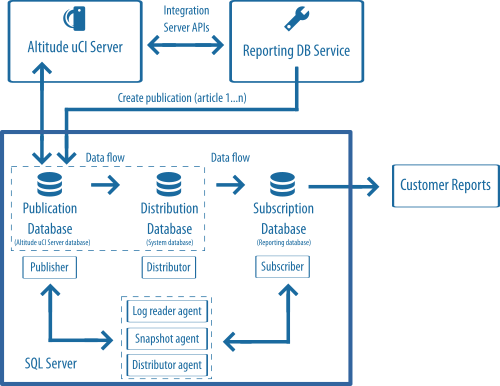
SQL Server Replication components
The main components of SQL Server Replication are the following:
- Publisher: SQL Server instance or server that publishes changes made on some tables (articles) by sending the updates to the Distributor.
- Distributor: SQL Server instance or server that collects changes in the articles from a Publisher and distributes them to the Subscribers.
- Subscriber: SQL Server instance or server that is receiving the changes made on the Publisher.
The Subscriber can be the same SQL Server instance, or a different one from the Publisher.
|
Note The Subscriber and the Publisher may be running different versions of SQL Server. Please see https://learn.microsoft.com/en-us/sql/relational-databases/replication/replication-backward-compatibility?view=sql-server-ver16. |
Each of the components has a corresponding database:
- Publication database: The Altitude uCI Server database.
- Distribution database: An SQL Server system database.
- Subscription database: The database where the customer report data will be written. In this case, the Reporting database.
The publication type used will be "Transactional publication", and the Distributor directly updates the data in the Subscriber database using a "Push subscription".
The following SQL Server agent jobs are responsible for the data replication:
- The Snapshot agent is responsible for generating snapshots of the articles in the Publication database.
- The Log reader agent moves replication transactions from the online transaction log of the Publication database to the Distribution database.
- The Distribution agent applies the snapshots to the Subscription database, and also moves transactions from the Distribution database to the Subscription database.
Reporting Database and SQL Server replication
The Reporting Database Service is a Windows service developed in C# .NET.
In the SQL Server Replication architecture, the Altitude uCI Server database server has the roles of Publisher and Distributor.
The Publication Database will be the Altitude uCI Server database.
The Subscriber will host the Subscription Database, which will be the Reporting database.
When the Reporting Database Service starts for the first time, the Reporting Database service:
- Creates an initial publication with the replication database tables.
- Creates the subscription.
- Configures the SQL Server agent jobs.
|
Important When the Reporting Database Service starts for the first time, the Reporting Database Service creates the first database snapshot for publication when there are no human agents ready in the contact center. |
Customers will be able to develop their own reports by directly querying the Subscription database.
|
Tip For additional security, to query the subscription database, you can, for example, have an SQL Server user with read-only access to the database, or create an ODBC connection to the database, in order to integrate the results with third-party applications. |
The Reporting Database Service uses the Integration Server APIs to get information from the Altitude uCI Server. For example, to support the plugin mechanism and to detect database schema changes in the Altitude uCI Server database.
|
Note To learn more about SQL Server replication, please see https://docs.microsoft.com/en-us/sql/relational-databases/replication/sql-server-replication |
Reporting Database and multiple Altitude uCI Server databases
A Reporting Database service can support several Altitude uCI Server installations. If the Altitude uCI Server databases are in the same SQL Server, the publisher is the same for all the Altitude uCI Server databases.
|
Important Other scenarios must be tested before deploying into production environments. |
Publication guidelines
During the creation of the publication, an initial snapshot will be created.
This initial step must be done during off-peak hours as there can be a big performance impact in the Altitude uCI Server operation.
The Reporting Database has an initial snapshot prevention mechanism to prevent the generation of the initial snapshot.
When the Reporting Database starts for the first time, if there are human agents ready or IVR agents handling interactions, the Reporting Database waits 5 minutes and tries again, until one of the following conditions is true:
- There are no human agents ready and no IVR agents are handling interactions
- The Reporting Database tried 5 times.
If the number of tries has been reached, the Reporting Database throws an exception and the Reporting Database service stops.
|
Important If the Reporting Database service stopped because there were agents ready or handling interactions, ensure that there are no agents ready and no IVR agents handling interactions, and manually start the Reporting Database service, so that the initial snapshot is generated. |
Reporting Database ports
See the list of ports for the Reporting Database in Altitude Ports.