Scripts
Agent Lite can run a default script or a customized script developed using Visual Script.
Agent Lite can run one of the following scripts, depending on the campaign configuration in the Management Portal. For example, if the campaign script defined in the Management Portal is "Default script", Agent Lite runs the default script.
|
Management Portal campaign |
Agent Lite script |
|---|---|
|
None |
Minimal script |
|
Default script |
Default script |
|
Visual Script |
Visual Script |
Minimal script
The minimal script that Agent Lite runs allows loading a contact profile, after which the agent can view and modify the information of the contact profile.
For inbound calls, the minimal script works as follows:
- If the phone number of the caller does not match any contact profile phone number, the agent can create a new contact.
- If the phone number of the caller matches exactly one contact profile, the contact related to the contact profile is automatically selected, and the agent only needs to confirm the person.
- If the phone number of the caller matches multiple contact profiles, the agent has to search for the right contact profile. The agent can check the contact profile details and confirm the correct contact profile.
For outbound calls, the minimal script automatically loads the contact profile associated with the contact.
Default script
The default script that Agent Lite runs is similar to the default script already available in the Agent Portal, and contains:
- Activity attributes
- Activity outcome attributes
- Contact profile attributes
When the agent receives an inbound call and searches for a contact to load, the script displays the contact profile attributes in the customer record.
You can configure which attributes you want to display and register in the default script by editing the configuration file of the default script, agentLiteConfiguration.json, located in the Web folder of the Integration Server. You can also define which attributes are mandatory to fill.
You must define the attributes you select as searchable in the Management Portal.
|
Important To set searchable columns, login to the Management Portal, select a directory, details group Business Rules, panel Agent Applications > Contact profile search. For inbound, Agent Lite uses the default directory of the service of the campaign where the agent is working. For outbound, you can configure which directories Agent Lite can use. |
For inbound calls, the default script works as follows:
- If the phone number of the caller does not match any contact profile phone number, the agent can create a new contact with the same attributes defined in the configuration file.
- If the phone number of the caller matches exactly one contact profile, the contact related to the contact profile is automatically selected, and the agent only needs to confirm the person.
- If the phone number of the caller matches multiple contact profiles, the agent has to search for the right contact profile using a field defined in the configuration file. The agent can check the contact profile details and confirm the correct contact profile.
Using a default script, the agent can register, for example, why a package was not delivered to a customer.
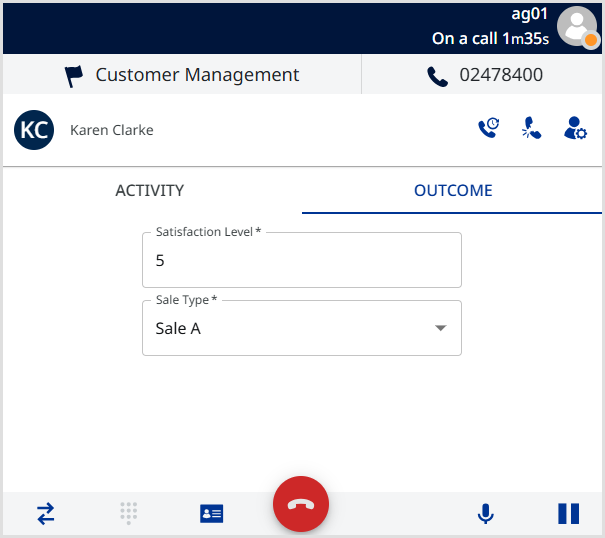
In the following example script, the agent can enter a satisfaction level and select a sale type from a list.
All the attributes are activity outcomes defined in the Management Portal as follows:
- The satisfaction level is an attribute of type number
- The sale type is an enumeration with different values.
Visual Script
In Agent Lite, agents can run a script developed with Visual Script. Visual Script is a web application that enables users to design interaction flows for human agent campaigns.
An agent script developed using Visual Script has a flow that the agent follows, and contains:
- Activity attributes
- Activity outcome attributes
- Contact profile attributes
When the agent receives an interaction, the script loads, and the agent can start interacting with the customer.
|
Tip To know more about Visual Script, please see Visual Script, where you can find how to develop and publish scripts. |