How to enqueue an interaction
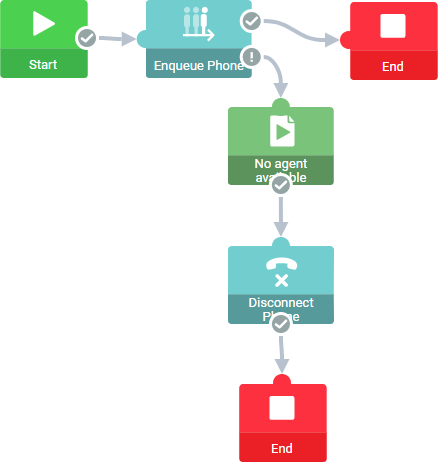
The example shows how to build a flow in Xperience Routing that enqueues a call.
- In the Xperience Routing editor, create a new flow.
- Add blocks and sequences to design the flow.
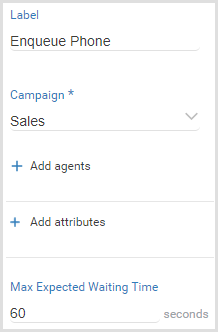
- Select the block Enqueue phone and configure the block properties.
- Publish the flow in the Altitude uCI Server.
- Associate the generated IVR script with a campaign.
How does the example work
- The IVR campaign receives a call.
- The IVR script runs and enqueues the call in the campaign Sales.
- If the expected waiting time does not exceed 60 seconds, the call remains in the queue.
- Otherwise, or if an error occurs, the IVR script plays a message informing the customer that there are no agents available, hangs up the call, and ends.