How to use Interaction History
Use Interaction History to see interactions and recordings.
Interaction History has the following parts:
- Date filter
- Additional filters
- Panel
- Columns selector
- Log out
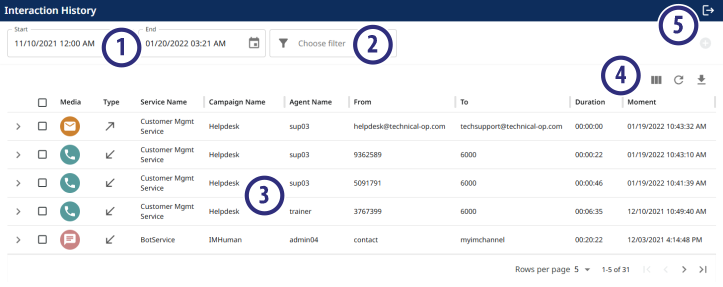
Date filter
Allows you to filter the interactions that are in the Panel. By default, Interaction History displays interactions from the previous day.
Click Start to select a start date and time, and End to select an end date and time.
Additional filters
Allows you to filter interactions by other criteria. The available filters are:
- Directory
- Service
- Campaign
- Agent
- Duration
- Media
- Recorded
- DNIS/To
- ANI/From
- Contact Profile Unique ID
|
FastPath The additional filter DNIS/To allows the use of the wildcard character %. For example, to search for all numbers that start with 123, enter 123%. |
Panel
Displays the interactions that match the Date filter and the Additional filters.
Columns selector
Allows you to configure which columns you want to display in the Panel.
The available columns are:
- Media
- Type
- Service Name
- Campaign Name
- Agent Name
- From
- To
- Interaction Id
- Interaction Duration
- Contact Profile Id
- Moment
- Directory Name
- Script Session Id
- Recorded
You can also Refresh the Panel, or Export the interactions to the following formats:
- CSV
- HTML
Audio interactions are exported in MP3.
Log out
Logs out the user from Interaction History.