Roles and permissions
Roles define the visible information and available actions for groups of contact center workers, such as agents, supervisors, or administrators, over each Altitude contact center entity.
Altitude requires all users to have an assigned role.
Permissions
You can configure the following types of permissions:
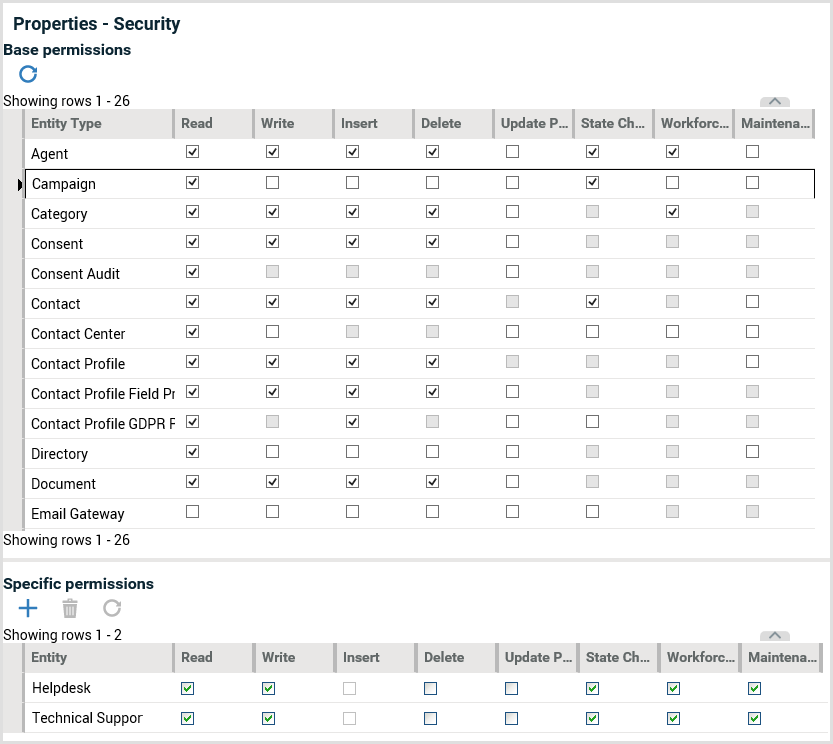
- Base permissions: Base permissions are the generic permissions over all entities of a specific type. For example, if the Read permission is selected in the entity Campaign, this means users with the role can see all the campaigns of the contact center.
- Specific permissions: Specific permissions are permissions assigned or removed to entities in a specific type. For example, for the entity Campaign, if the base permission Write is not selected, users with the role cannot edit the properties of any contact center campaign. If there is a specific Write permission selected for the campaign Helpdesk, users can only edit the properties of the campaign Helpdesk.
- Agent application permissions: Agent application permissions define what operations users with the role can use in the Agent Portal, and what customer information the users can see. For example, agent application permissions define if users can start or stop media interactions, control data sessions and contact information, and access the Knowledge Base documents.
Note
You can define agent application permissions in the panels Interface Operations in a role.
To define permissions in Management Portal, do the following:
- Select the tab Configuration.
- Select the current context of the contact center.
- Select the details group People, panel Roles.
- Select a role.
- Select the details group Properties, panel Security.
If a check box is grayed out in the panel, the specific operation is not possible in the context. For example, in the following image, the permission State Change is not available for the entity Category, since Knowledge Base categories do not have states.
Also, in the specific permissions, the permission Insert is grayed out for all campaigns, since you cannot insert campaigns in a specific campaign.
The following image displays the complete base permissions for the built-in role Supervisor, as well as specific permissions for the entity type Campaign.
Operations covered by permissions
For each entity type, the role has a permission profile for the following operations:
- Read
- Write
- Insert
- Delete
- Update Permissions
- State Change
- Workforce Management
- Maintenance