Pacing modes
The pacing modes define how the Altitude uCI Server places outbound calls.
- Inbound campaigns usually place scheduled callbacks in power dialing.
- Outbound campaigns place calls in power, preview, or predictive dialing.
- Blended campaigns allow predictive dialing to handle a small rate of inbound calls.
Power dial
Power dial places calls from agent extensions. The Altitude uCI Server asks the telephony switch to place calls from the extension of an agent. The agent hears the call being made and the ringing tone when the call reaches the remote phone. Therefore, agents are idle until a contact answers a call.
If the contact answers, the telephony gateway informs the Altitude uCI Server, and the Altitude uCI Server informs Agent Portal at the correct workstation. If the contact does not answer after a predefined time, the Altitude uCI Server asks the telephony switch to make another call.
Preview dial
Preview dial starts with the agent script displaying the contact data of the contact to call. The agent then views the contact data to decide whether to call the contact.
If the agent decides to call the contact, the Altitude uCI Server asks the telephony switch to place the call from the extension of the agent. The agent hears the call being made and the ringing tone when the call reaches the remote phone.
If the agent decides not to call the contact, the agent ends the script, and the Altitude uCI Server starts the agent script with the data of the next contact.
For example, an outbound debt collection campaign uses preview dial so that agents can view information about contacts to decide whether to call the contacts.
Predictive automatic
Predictive automatic is most suitable for campaigns with 10 or more agents.
In predictive automatic, the Altitude uCI Server statistically monitors the working times of all the agents working in a predictive campaign. The Altitude uCI Server predicts when agents will be available based on the following:
- The position of agents in the campaign script
- The past behavior of agents in similar situations.
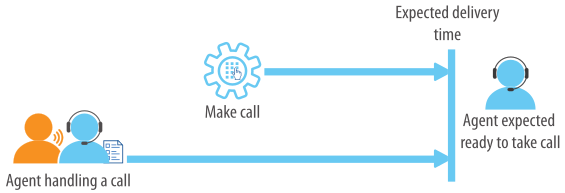
The Altitude uCI Server then predicts how many calls to place, taking into account the expected delivery time and success rate of calls. Predictive automatic is controlled by the following:
- Requested nuisance ratio
- Requested service level, for blended campaigns only.
Predictive average talk time
Predictive average talk time is most suitable for campaigns that have short calls and small variations in the talk time. For example, campaigns with short and simple scripts, such as short surveys.
Predictive average talk time uses the average duration of calls to determine when to place calls. The Altitude uCI Server uses the average talk time to predict when the agent will finish the current call. Then, the Altitude uCI Server uses the expected delivery time to place calls ahead of time, as shown below.
The pacing mode Predictive average talk time is controlled by one of the following:
- Requested nuisance ratio
- Requested service level, for blended campaigns only.
Blended campaigns
Blended campaigns place outbound calls using predictive dial while receiving inbound calls.
Outbound calls maximize the performance of agents by ensuring that the agents are kept busy during periods of low inbound call volume. Blended campaigns must use the pacing modes Predictive automatic or Predictive average talk time.
The Altitude uCI Server controls the predictive dial to maximize agent performance while respecting the requested ratio of nuisance calls and taking into consideration the inbound call rate. However, the nuisance enforcement policies will not be able to limit the nuisance ratio.
|
Attention Blended campaigns do not comply with FTC (USA) or OFCOM (UK) regulations on nuisance calls. |
Pacing modes according to the type of campaign
The table below displays the pacing modes that can be associated to each type of campaign. For example, blended campaigns can have the pacing modes Predictive average talk and Predictive automatic.
|
Pacing mode |
Inbound |
Outbound |
Blended |
|---|---|---|---|
|
Power dial |
|
|
|
|
Preview dial |
|
|
|
|
Predictive automatic |
|
|
|
|
Predictive average talk |
|
|
|

