Architecture scenarios
Architecture scenarios represent a contact center with Altitude components. Some scenarios represent complete examples, while others represent a part of an installation. Diagrams represent architecture scenarios.
Diagrams have the following parts:
- Customers
- Workstations
- Server computers
- Other systems.
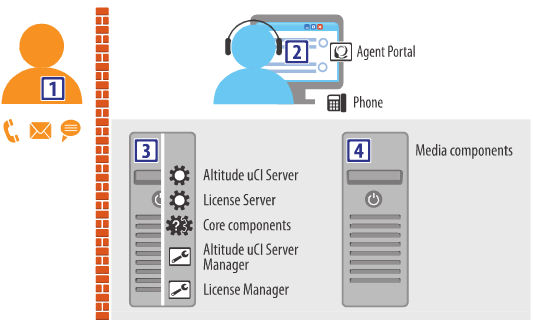
Customers
Customers are drawn as humans next to a representation of the possible interactions with the contact center. The orange brick wall represents the firewalls that protect contact center systems from malicious Internet users.
In the example, customers can interact with the contact center through calls, emails, and instant messages.
Workstations
Workstations are drawn as a Human looking into a monitor, with icons representing specific components installed at the workstation, such as graphical applications and phone sets.
In the example, an agent workstation runs the Agent Portal and uses a phone.
Server computers
Server computers are drawn as an open case with icons representing computers with a specific set of services, applications, and hardware. The first service is typically the most important functionality provided by the server.
In the example, the server computer runs several services (Altitude uCI Server, License Server, and other core components) and two configuration applications (Altitude uCI Server Manager and License Manager).
Other systems
Server computers drawn as closed cases represent third-party systems, or a combination of computers, as explained in the document.
In the example, the closed computer represents a choice of media components.
Icons for graphical applications
Computers have the following types of graphical applications:
 Web browser: Icon for a supported web browser, a Windows application that allows access to web-based applications. For example, Microsoft Edge or Google Chrome.
 uAgent Softphone: Icon for a Windows application that implements a SIP phone.
 Configuration application: Icon for one of several Altitude Windows applications that configure services.
 Agent desktop application: Icon for a choice of desktop application that presents information to agents, allowing agents to manage work and handle interactions with customers. The choice of application typically depends on decisions explained in the document.
Icons for services
Computers have the following types of server software components:
 Service: Icon for a Windows service, usually configured through a dedicated Windows application or through a web browser.
 Service: Icon for a choice of service required to provide some functionality. The choice of service typically depends on decisions explained in the document.
 Services: Icon for a choice of services required to provide certain combined functionality. The choice of service typically depends on decisions explained in the document.
Icons for hardware
Computers have the following types of hardware components:
 Phone: Icon for a choice of phone with an extension number in the telephony switch. Phones can be physical phone sets, or softphone applications.
 Voice board: Icon for a choice of Digium or Dialogic voice board, used by specific services to provide ISDN PRI trunks, or analog or digital automated IVR agent extensions for a third-party telephony switch.
 Recording Adapter: Icon for an Altitude Recording Adapter, a physical adapter that taps into the analog signals arriving at the handset or headset of an agent phone. The adapter feeds the signals into a third-party sound card supported by Windows.