How to install Update Manager
Install Update Manager to download the Altitude components.
ComponentsThe Update Manager installer includes the following component:
- Update Manager.
Download the installer as follows:
- Open a ticket with Enghouse Customer Support to request an account.
- Download Update Manager using the provided account. Choose the installer according to the desired operating system and Altitude major version.
- Log in to Windows using a Windows account with administrative privileges.
- Execute the setup of the Update Manager.
-
Define the installation folder and usage.
- Folder: If needed, change the Update Manager folder. The default value is C:\Program Files\Altitude Software\Altitude uCI Update Manager 8\.
- Usage: Choose to make Update Manager available to anyone logged in the host computer or only to you.
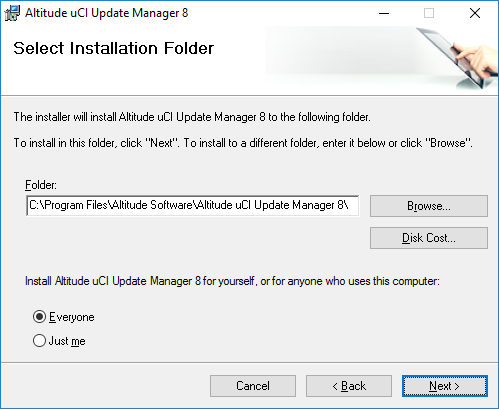
- Click Next.
- Click Install.