Architecture
Altitude VoIP network requirements for using Altitude vBox 5.1.
Security protocols
The secure default protocols to use on authentication to Altitude vBox 5.1 are:
- TLS 1.2
- TLS 1.3
Altitude vBox 5.1 trunk architecture
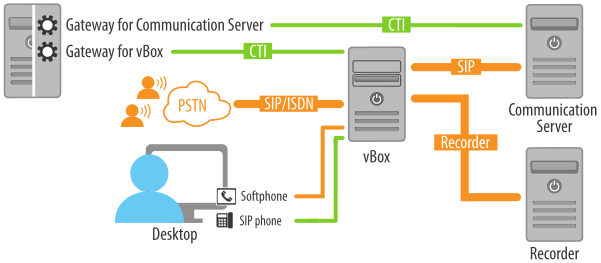
|
Attention The Altitude vBox 5.1 native outbound with predictive dialing functionality is deprecated. To perform outbound with predictive dialing with Altitude vBox 5.1 you must use the Altitude Call Classifier. |
VoIP network requirements with Altitude vBox 5.1 are the following:
- Fully switched.
- Bandwidth of 100Mbps.
- Service quality (recommended):
- Layer 2 (CoS or 802.1p).
- For remote links between agents workstations and Altitude vBox 5.1, use Layer 3 (QoS) with end-to-end technology .
Connect Altitude vBox 5.1 to the VoIP network as follows:
- Using ISDN PRI and/or SIP trunks. The Altitude vBox 5.1 connects to ISDN PRI trunks directly on the PSTN or behind a telephony switch.
Note
All the ISDN PRI interfaces in an Altitude vBox 5.1 server must share a single clock server. You must connect all ISDN PRI interfaces to the same provider or implement a solution to synchronize clocks among providers.
- Using a SIP connection to the ACME Packet Session Border Controller
|
Note You can use both type of connections in the same infrastructure. |
The Altitude vBox 5.1 connects to the voice network using UDP SIP trunks to:
- Altitude vBox
- Altitude Communication Server (used as Call Classifier)
- Asterisk (either 1.2 or 1.4 releases)
- SkypeConnect trunks. Check http://www.skype.com/intl/en/business/skype-connect/.
- SIP servers and SIP providers with a successful and documented interoperability test with Altitude vBox 5.1.
|
Attention The Altitude vBox 5.1 cannot have public IP addresses exposed to the Internet, in order to avoid hacking attacks that can cause denial of service or increased Telecom costs. On the other hand, SIP providers sometimes require their customers to supply public IP addresses for the customer SIP servers. In this case, you need to either adequate firewall configuration, a Session Border Controller, or a third-party SIP proxy between the SIP trunk and the Altitude vBox 5.1 servers. |
Customers must deploy appropriate protection mechanisms to expose the VoIP call endpoint to the Internet. You must keep Altitude vBox 5.1 in the internal network.
You can use all types of trunks (ISDN PRI, SIP, and VoIP calls) on the same Altitude vBox 5.1 Media Gateway.
Operational parameters
The network must have the following operational parameters:
- End-to-end one-way latency up to 150ms.
Note
Agent phones may consume part of the latency through jitter buffers.
- Packet loss up to 1%.
- The value of jitter must match the phone configuration. For example, threshold of 10 ms.
- Enough bandwidth to support the target number of agents with the selected codec.
Recording formats
Altitude vBox 5.1 can record calls in the following formats:
- GSM
- WAV
WAV files require more disk space, while GSM files use less bandwidth when transferred to an Altitude Recorder Storage Server. Altitude recommends the GSM format.
You can also configure Altitude vBox 5.1 to record both legs from a call, or only the agent leg.
|
Important Altitude vBox 5.1 does not support stereo recording. |
Remote connections
Altitude vBox 5.1 servers should be in the same LAN, and can have remote connections to the following components:
- Telephony gateway.
- Altitude Recorder Storage Server.
- SIP provider.
- Altitude Communication Server.
Connection to agent extensions
Connect agent phones as follows:
- Directly to Altitude vBox 5.1. Agent phones must have direct IP access to the Altitude vBox 5.1. Altitude vBox 5.1 must have direct IP access to agent phones.
Note
Direct connections between agent phones and Altitude vBox 5.1 cannot use NAT, and SRTP or TLS.
- Use an ACME Packet Session Border Controller.
Guidelines
To reduce WAN bandwidth requirements, deploy the telephony gateway and Altitude vBox 5.1 in the same LAN and connect the telephony gateway to the Altitude uCI Server using the WAN.