Altitude SIP Phone
The Altitude SIP Phone is an application that uses the Integration Server API and Altitude vBox to integrate with uAgent Web, Agent Lite, or a third-party application.
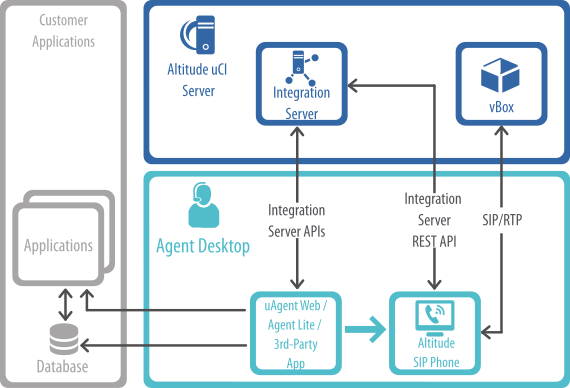
Which softphone to use with uAgent Web and Agent Lite
The following table displays, for the different web browsers, which softphones are certified:
|
Agent browser |
Telephony through |
|
|---|---|---|
|
Altitude SIP Phone |
WebRTC |
|
|
Edge |
Certified |
Certified |
|
Chrome |
Certified |
Certified |
How to configure the Altitude SIP Phone
To integrate uAgent Web with the Altitude SIP Phone, you need to configure the following key in the Integration Server configuration file Web.config, as follows:
<integrationServer>
(...)
<attachToSoftPhoneEnabled>true</attachToSoftPhoneEnabled>
</integrationServer>
Windows system tray
When the Altitude SIP Phone starts, the icon  appears in the Windows system tray.
Depending on the status of the connection, the Altitude SIP Phone displays one the following icons:
- The Altitude SIP Phone is not connected and is not trying to connect.
 The Altitude SIP Phone is not connected but is trying to connect.
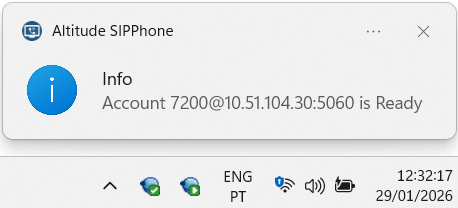
 The Altitude SIP Phone is connected. The Altitude SIP Phone displays an extension icon in the Windows system tray for the SIP connection to the Altitude vBox.

The extension icon displays notifications when the agent performs an operation. For example, change or clear the extension.
Modes of operation
After you install the Altitude SIP Phone, you must edit the configuration file appsettings.json, located at: C:\ProgramData\Altitude\Altitude uCI 8\Configuration\Altitude SIPPhone, to customize how the Altitude SIP Phone authenticates with the Altitude uCI Server.
When uAgent Web, Agent Lite, or a third-party application tries to login to Altitude with the same username and password as configured in the Altitude SIP Phone, the Altitude SIP Phone connects to Altitude with the user, and waits to set the extension.
When uAgent Web, Agent Lite, or a third-party application executes a Set Extension operation, the Altitude SIP Phone registers the extension in Altitude vBox.
|
Important Only one Altitude SIP Phone is allowed to run on a given machine at a given time. All other instances exit immediately. |
Altitude SIP Phone ports
See the list of ports for the Altitude SIP Phone in Altitude Ports.