Call Aged script
This script can only be run on email or voicemail messages.
It is called when an email or voicemail has been in the deferred folder for longer than the configured Ageing Timeout Interval. Ageing starts from when the agent defers the call, not from call arrival.
By default, an agent cannot defer a call after it has aged once. You can use this script to override the default as follows.
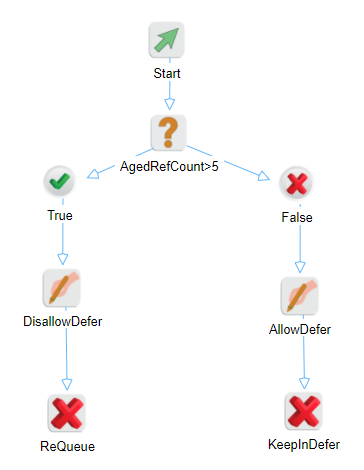
The blocks in the above example function as follows.
|
Block |
Name |
Description |
|---|---|---|
|
Condition |
AgedRefCount>5 |
Check if Ageing RefCount is bigger than 5. To check, set Expression = $EmailCall.AgeingInfo.AgedRefCount$ > 5 Each time the item is aged, the ref count increases by one. |
|
Assign
|
DisallowDefer |
If true, don't allow this item to be deferred again. To disallow defer, set $EmailCall.AgeingInfo.IsDeferAvailable$=False |
|
AllowDefer |
If false, allow this item to be deferred again. To allow defer, set $EmailCall.AgeingInfo.IsDeferAvailable$=True |
|
|
Terminate
|
ReQueue |
If disallow defer, continue the process and requeue the call. To requeue, set Terminate = No. |
|
KeepInDefer |
If allow defer, keep this item in the deferred folder. To keep in the deferred folder (terminating the call cancels the ageing operation), set Terminate = Yes. |