Call Rejected script
This script is interpreted when the Call Rejected Event is fired.
It executes as follows:
- Play an announcement that no agents are available.
- Offer a menu asking the caller if they want to leave a voicemail.
- If caller selects to leave a message, record the message.
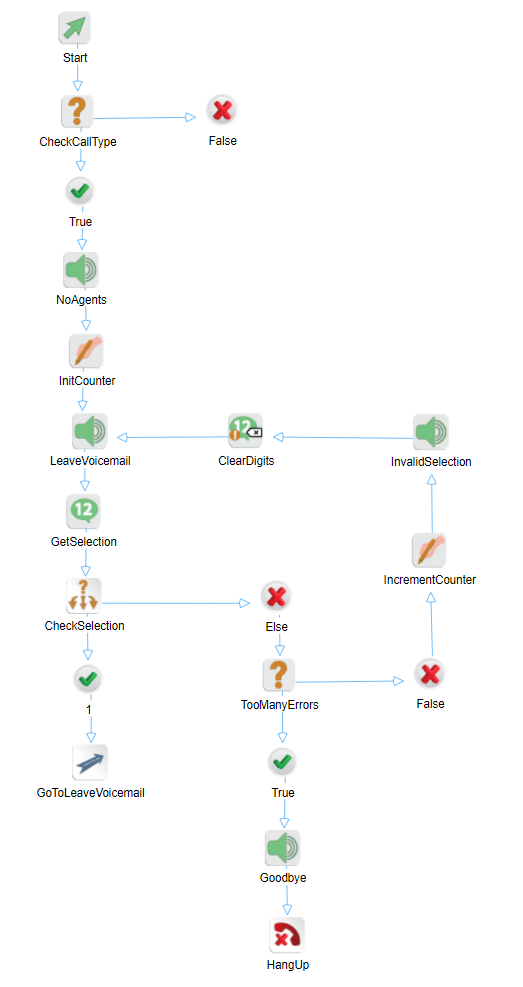
The blocks function as follows.
|
Block |
Name |
Description |
|---|---|---|
|
Condition |
CheckCallType |
Checks the call type of the current call. Since all this script does is to leave a voicemail, it only makes sense to do this for VCS calls. The CCLEvent.CallType property is set to 0 for chat calls, 2 for email calls and 3 for VCS calls. |
|
Play Audio |
NoAgents |
Plays the no agents announcement. It clears the DTMF buffer before playing and allows the caller to enter any DMTF digit to interrupt the announcement. |
|
Assign |
InitCounter |
Initializes a counter called Counter to one (1). |
|
Play Audio |
LeaveVoicemail |
Plays the Do you want to leave a voicemail ... announcement. It allows the caller to interrupt the announcement with any DTMF entry. |
|
Check Digits |
GetSelection |
Gets a one digit DTMF entry from the caller and saves the entry in the variable called Selection. It waits up to five (5) seconds for this digit before timing out. |
|
Switch |
CheckSelection |
Checks the selection entered by the caller and selects the appropriate path. |
|
GoTo |
GoToLeaveVoicemail |
If the caller enters a 1, then jump to the LeaveVoiceMail.xml script. |
|
Condition |
TooManyErrors |
If the caller selects anything else from the menu, this checks to see if they exceeded the maximum number of allowable invalid entries, which is three (3). |
|
Assign |
IncrementCounter |
Increments the counter by one. |
|
Play Audio |
InvalidSelection |
Plays the invalid selection announcement to the caller. It does not allow the caller to interrupt this announcement. |
|
Clear Digits |
ClearDigits |
If the caller enters any DTMF digits while the Invalid Selection announcement is being played, the caller is not interrupted, but the VCS would store those DTMF digits in its buffer. So the buffer should be cleared out before continuing. Not doing this causes confusion to the caller. |
Alternatively, you can configure the rejected script to set every abandoned VoIP call as abandoned in queue.
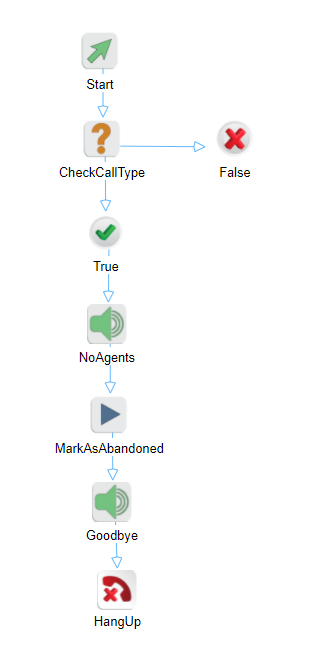
The blocks function as follows.
|
Block |
Name |
Description |
|---|---|---|
|
Condition |
CheckCallType |
Checks the call type of the current call. |
|
Play Audio |
NoAgents |
Plays the no agents announcement. |
|
Run |
MarkAsAbandoned |
Executes cosmocall.MarkAsAbandoned(true), which sets abandoned calls in the rejected script to be reported as abandoned. Note If cosmocall.MarkAsAbandoned(false), or the Run block is missing, sets abandoned calls in the rejected script to be reported as rejected. |