Ivr script
This script is interpreted when the Incoming Call Event is fired for an incoming VCS call.
It executes as follows:
- Play a greeting announcement.
- Assign a queue depending on the DNIS of the inbound call.
- Offer a menu for the caller to select if they are a new or existing customer and sets the skill accordingly.
- If the caller is an existing customer, it prompts them to enter their customer ID, validating it against a database.
|
Caution Your IVR script should assign a queue for every voice call. |
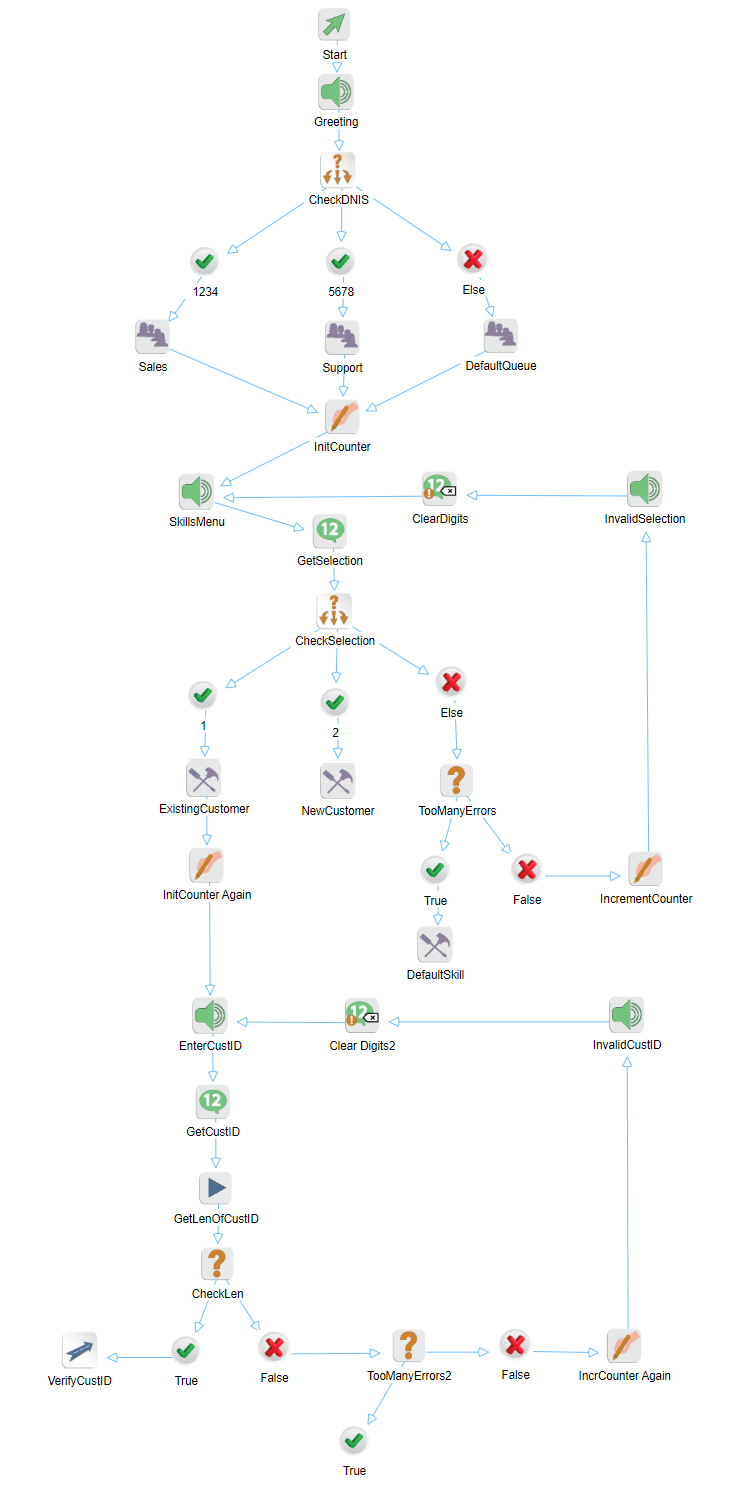
The blocks function as follows.
|
Block |
Name |
Description |
|---|---|---|
|
Play Audio |
Greeting |
Plays the greeting announcement to the caller. It clears the DTMF buffer prior to playing. It also allows the caller to interrupt the announcement with any DTMF entry. |
|
Switch |
CheckDNIS |
Checks the DNIS of the inbound caller to see if it is equal to either 1234 or 5678 or neither, and selects the appropriate path. |
|
Queue Name
|
Sales |
Sets the queue for the current call to Sales, if the DNIS is equal to 1234. |
|
Support |
Sets the queue for the current call to Support, if the DNIS is equal to 5678. |
|
|
DefaultQueue |
Sets the queue for the current call to DefaultQueue if the DNIS is anything else. |
|
|
Assign |
InitCounter |
Initializes a counter called Counter to be used in keeping track of invalid entries made by the caller. |
|
Play Audio |
SkillsMenu |
Plays the skills menu announcement. It allows the caller to interrupt the announcement with any DTMF entry. |
|
Get Digits |
GetSelection |
Waits for a one digit DTMF entry from the caller and saves the entry in the variable called Selection. It waits up to 5 seconds for this digit before timing out. |
|
Switch |
CheckSelection |
Checks the selection entered by the caller and selects the appropriate path. |
|
Add Skill
|
ExistingCustomer |
Adds the skill of ExistingCustomerSkill to the call if the caller selects 1 from the Skills Menu. |
|
NewCustomer |
Adds the skill of NewCustomerSkill to the call if the caller selects 2 from the Skills menu. |
|
|
Condition |
TooManyErrors |
If the caller selects anything else from the Skills menu, then this checks to see if they exceeded the maximum number of allowable invalid entries, which is three (3). |
|
Add Skill |
DefaultSkill |
This assigns the DefaultSkill to the call if too many errors were made by the caller. |
|
Assign |
IncrementCounter |
Increments the counter by one. |
|
Play Audio |
InvalidSelection |
Plays the invalid selection announcement to the caller. It does not allow the caller to interrupt this announcement. |
|
Clear Digits |
ClearDigits |
If the caller enters any DTMF digits while the Invalid Selection announcement is being played, the caller would not be interrupted, but the VCS would store those DTMF digits in its buffer. So the buffer should be cleared out before continuing. Not doing this causes confusion to the caller. |
|
Assign |
InitCounterAgain |
If this is an existing customer, the system is now going to prompt them to enter their customer ID. So initialize the counter again. |
|
Play Audio |
EnterCustID |
Plays an announcement instructing the caller to enter their customer ID number. |
|
Get Digits |
GetCustID |
Gets up to (4) four digits from the caller. Waiting for a maximum of ten (10) seconds for all digits to be entered or a maximum of three (3) seconds between digits. It stores the resulting entry in the variable CustID. |
|
Run |
GetLenOfCustID |
Gets the length of the CustID entry and stores it in a variable called CustIDLen. It uses the VBScript function Len() to do this. |
|
Condition |
CheckLen |
Checks to see if the number of digits entered by the caller is equal to four. |
|
GoTo |
VerifyCustID |
Runs the DBLookup.asp script that looks up the entered Customer ID in the database to see if it is valid. |
|
Condition |
TooManyErrors2 |
If the customer ID is invalid, then this checks to see if they exceeded the maximum number of allowable invalid entries, which is three (3). |
|
Assign |
IncrCounterAgain |
Increments the counter by one. |
|
Play Audio |
InvalidCustID |
Plays the invalid customer ID announcement. It does not allow the caller to interrupt this announcement. |
|
Clear Digits |
ClearDigits2 |
If the caller enters any DTMF digits while the Invalid Selection announcement is being played, the caller would not be interrupted, but the VCS would store those DTMF digits in its buffer. So the buffer should be cleared out before continuing. Not doing this causes confusion to the caller. |