Music On Hold In Queue script
This script is interpreted when the Music On Hold In Queue Event is fired. It executes as follows:
- Play please hold announcement
- Play selected music (.wav file).
- Offer a menu asking the caller if they want to leave a voicemail or continue holding.
- If caller selects to leave a voicemail, record the voicemail, otherwise loop back and start playing music again.
|
Note To have the music loop, you must program this behavior within the script. |
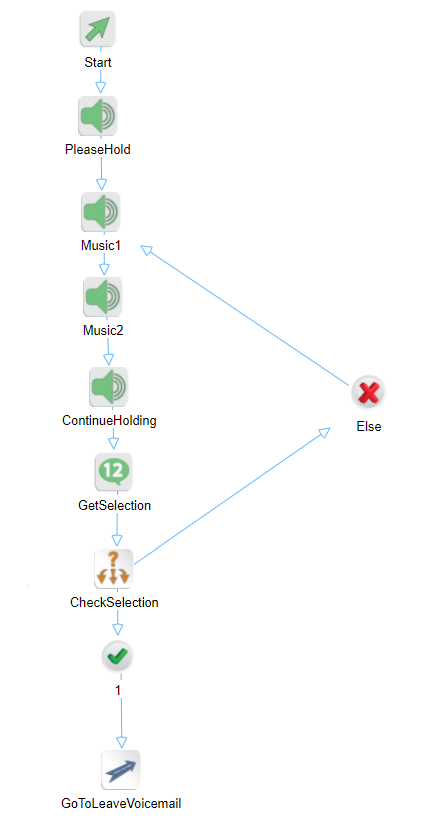
The blocks function as follows.
|
Block |
Name |
Description |
|---|---|---|
|
Play Audio |
PleaseHold |
Plays the please hold announcement. |
|
Play Audio |
Music1 |
Plays a music announcement. It does not allow the caller to interrupt the announcement. |
|
Play Audio |
Music2 |
Plays another music announcement. It does not allow the caller to interrupt the announcement. |
|
Play Audio |
ContinueHolding |
Plays an announcement asking the caller if they would like to continue holding or leave a voicemail. |
|
Get Digits |
GetSelection |
Gets a one digit DTMF entry from the caller and saves the entry in the Selection variable. It waits up to five (5) seconds for this digit before timing out. |
|
Switch |
CheckSelection |
Checks the selection entered by the caller and selects the appropriate path. |
|
GoTo |
GoToLeaveVoicemail |
If the caller enters 1, then jump to the LeaveVoicemail.xml script. |