Leave Voicemail script
This script guides a caller into leaving a voicemail message for a called party.
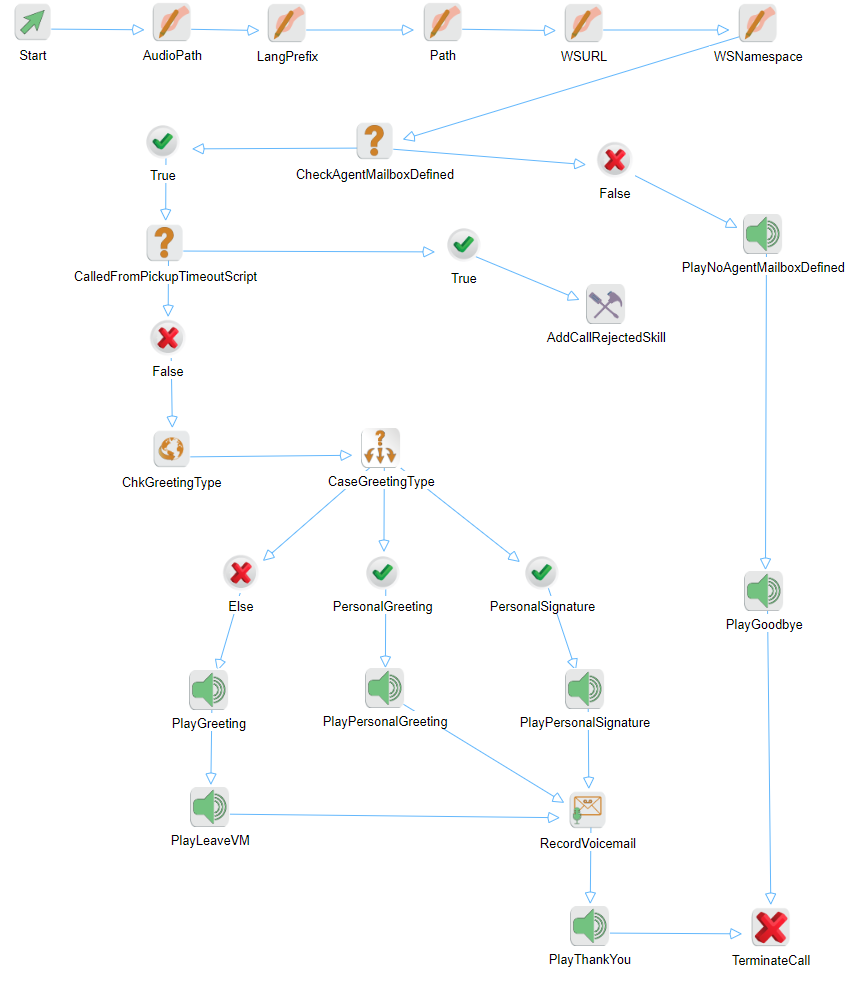
|
Caution We recommend that you do not modify this script. |
The blocks function as follows.
|
Block |
Name |
Description |
|---|---|---|
|
Assign
|
AudioPath |
Assign variable AudioPath, value=./Voicemail/. This is an audio file path local to the VCS system. Default location is C:/Program Files/Cosmocom/Server Components/Scripts/AllWaves/Voicemail. |
|
LangPrefix |
Assign variable =LangPrefix. The language prefix used before playing any audio file. If no prefix is specified, the language is English. |
|
|
Path |
Assign variable =$AudioPath$$LangPrefix$. The complete path to the audio file, including any language prefix specified. |
|
|
WSURL |
Assign variable =WSURL, value=$session.VoicemailWSURL$VoicemailWebService.asmx. This is the Voicemail web service URL. |
|
|
WSNamespace |
Assign variable =WSNamespace, value=http://CosmoCom.com/WebServices/VoicemailWS. This is the voicemail web service namespace. |
|
|
Condition
|
ChkAgentMailboxDefined |
Conditional expression=$calldata.DIDAgentVoiceMailEnabled$. Check that the user mailbox is enabled. If the user does not have a voicemail box, the user cannot receive voicemail. If TRUE, go to CalledFromPickupTimeoutScript. If FALSE, go to PlayNoAgentMailBoxDefined. |
|
CalledFromPickupTimeoutScript |
Conditional expression=$CallData.Option(ScriptID)$. If called from pickup timeout script, call should be rejected. Therefore, stop executing any logic in the leave voicemail script. If TRUE, go to AddCallRejectedSkill. If FALSE, go to ChkGreetingType. |
|
|
Web Services |
ChkGreetingType |
Get the type of greeting to play. |
|
Switch |
CaseGreetingType |
Check the type of greeting to play. Valid greeting types are:
Else branch: Go to PlayGreeting to play the standard greeting. PersonalGreeting branch: Go to PlayPersonalGreeting. PersonalSignaturebranch: Go to PlayPersonalSignature. |
|
Play Audio
|
PlayGreeting |
Play standard greeting. |
|
PlayPersonalGreeting |
Play personal greeting. |
|
|
PlayPersonalSignature |
Play personal signature greeting. |
|
|
PlayLeaveVM |
Play Please leave voicemail message. |
|
|
Record Voicemail |
RecordVoicemail |
Record caller's voicemail message |
|
Add Skill |
AddCallRejectedSkill |
Reject the call. The CallRejectedSkill skill must exist in your tenant. |
|
Play Audio
|
PlayNoAgentMailBoxDefined |
Play the agent mailbox not defined message. |
|
PlayThankYou |
Play thank you and goodbye message. |
|
|
PlayGoodbye |
Play the good bye announcement. |
|
|
Terminate |
TerminateCall |
Terminate the call |
This script implements the following caller message flow.

For the voice prompts used in this script, see Voicemail processing prompts.