Speech Play and Collect

This block is only available if IVR is enabled.
This block enables the playing of audio or Text-to-Speech (TTS) and collection of human speech or touchtone digits.
The block also enables caller barge-in, which occurs when a caller speaks during playback. See Stop Prompt On property below.
|
Note The times used for speech recognition are dependent on each other and used in the following way:
To enable successful speech recognition process to complete, the Max Time must exceed the maximum expected speech input time of the caller plus two times the Max Silence time. For example, a scenario with a maximum expected speech input time of 5 seconds to input a single number or name, and a maximum silence time of 2 seconds to wait for start and completion of input, requires the following settings, in seconds:
|
|
Properties |
Values |
Description |
|---|---|---|
|
Text or Audio File |
String |
Enter a .wav file, plain text, or Speech Synthesis Markup Language (SSML) string. For a .wav file, do one of the following:
|
|
Start of Input, |
This property determines if caller barge-in is enabled or disabled:
|
|
|
Grammar |
String |
The grammar determines what to recognize in a caller's speech when barge-in is enabled, and a barge-in occurs. Specify your grammar(s) in one of the following ways:
If more than one grammar is used, separate the grammars with a semicolon (;). You can list up to ten grammars separated by ; or list the Content-ID. The speech is compared to the grammar. If recognition is successful, playback is stopped, the result variable is assigned, and the next block is executed. |
|
Confidence Level (optional) |
Percent |
This is a confidence threshold parameter. The speech recognizer computes a confidence level. If the level is below the threshold you set, the recognizer returns no-match as the recognition result. If the level is at or above the threshold, then recognition is successful. The minimum is 50 and the maximum is 100. The default is 50. |
|
Speech Rate |
Slow, Medium, or Fast |
The rate for reading a Text to Speech (TTS) message. |
|
Volume |
Soft, Medium, or Loud |
The volume level for reading a TTS message. |
|
Termination Digits |
0-9 # and * |
Enter digit(s), # or * . These value(s) can be used by the caller to indicate the end of their response. When a termination digit is pressed, playback stops, and the script executes the next block. |
|
Max Time |
Seconds |
Maximum permitted duration of the caller’s spoken response, starting when the caller first begins speaking. Generally, there is no reason to change this from the default value. Maximum permitted setting is 30 seconds. The default is 20. This property applies only to Automatic Speech Recognition (ASR). |
|
Max Digits |
Number |
The maximum number of caller response DTMF digits. When the limit is reached, the script proceeds to the next block. Note Typically 3 is too low a number to work reliably and this value is set to 10 or 3 x number of digits to be entered. |
|
Max Silence |
Seconds |
The maximum length of time to wait for the caller's next response. The default is 5. |
|
Clear Digits |
Yes or No |
Clear the digit buffer of any digits entered before playing the audio file. The default is No. |
|
Result Variable |
String |
Name of a variable into which the digit string is to be passed. Must start with an alphabetic character and not exceed 255 characters in length. There is no default value for this, so leaving this field blank causes this block not to function properly. See How to use variables. |
|
Line |
Inbound |
The next block in the script is applied to the original (incoming) call. |
|
Outbound |
The next block in the script is applied to the outbound call (to where the call is transferred). |
|
|
Input Mode |
Speech and DTMF, |
If you select Speech and DTMF, and if the caller presses a key (DTMF), the system ignores anything the caller says after the key press. If you select Speech and DTMF, and if the caller speaks, the system ignores any key press after anything the caller says. The default is Speech and DTMF. |
|
Comment |
Text |
Optional description of this block in your script. |
Configure the Speech Play and Collect block
|
Caution Do not rename the Success branch. Otherwise, when the external speech server returns success, CCaaS routes the script to the else case. |
- Right-click the block and click Add case. The Speech Play/Collect dialog appears.
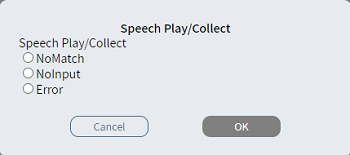
- From the SpeechPlayCollect list, select one of the following:
- NoMatch — recognition did not succeed or caller pressed invalid DTMF.
- NoInput — the caller did not respond.
- Error — technical issues prevented speech recognition.
- Click OK. The Case branch
 appears.
 - Connect the Case branch to the appropriate block in the script.
- Repeat steps 1-4 to add the branches you need.
- Connect the Success branch to the appropriate block in the script.
- Connect the Else
branch
 to the appropriate
block in the script.
to the appropriate
block in the script.