Transfer by Refer

VCS only.
This block transfers a SIP call without using IVR ports.
|
Properties |
Values |
Description |
|---|---|---|
|
Phone Number |
0‑9 * and # |
Any valid phone number to which to redirect the call, for example, +16315551212 The + format makes the number location independent. This should be used unless you know all of your VCSs are in the same location. If you are using a variable, add + to the value of the variable, for example, +$NumberDialed$. After the Answer case, no blocks are executed. If the phone number is not reachable (404 SIP error code), the NoAnswer case is executed. Note
|
|
Source ID |
String |
Note This information is shown only if the Source display property is missing.
When transferring a call, you can optionally set the source address (CallingPartyNumber) from the script you are using. If this is left blank, the ANI for the gateway is used, if that is not set, the ANI for the tenant is used. E.164 takes the format TEL:1234 or TEL:$anyvalidnumberorvariable$ All possible values for this property should be contained in a single string, such as: NAME:NJONES,NAME:FSCHMIDT,TEL:1234567 The source address can be specified as an E.164 address denoted by the TEL: prefix. |
|
Source Display |
String |
What to display as a source. This property is also known as CallerID or CallingPartyName. |
|
Connect Timeout |
Integer |
The number of seconds to wait for a connection. The default of 10 seconds is used when the value is:
|
Configure the Transfer by Refer block
- Right-click the block and click Add case. The Transfer dialog appears.
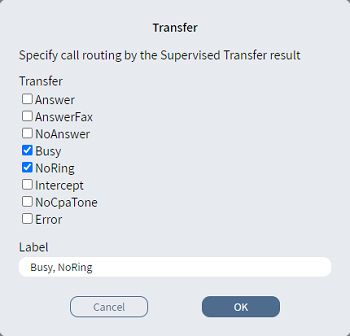
- From the Transfer list, select one or more items.
- Optionally, in Label, type an alternative description.
- Click OK. The Case branch
 appears.
 - Connect the Case branch to the appropriate block in the script.
- Connect the Else
branch
 to the appropriate
block in the script.
to the appropriate
block in the script.