Making RfU list selection variables optional
In Reporting, all RfU (Request from User) variables in reports are required (marked with *) by default. Reports connected to data models that include RfU variables, or reports that require RfUs themselves (defined in the report editor Dictionary), will not be rendered unless the viewer of the report submits a value for all required variables.
To allow viewers the possibility of filtering using variables, but not making it mandatory, it is possible to make most of the variables optional. The possibility to make a variable optional depends on the data Type field.
For example, with numerical values it is possible to use the Nullable Value nature of the value, and entering 0 in the Value field can represent no selection from viewers. However, the String data type cannot be used in combination with Nullable Value. If this combination is selected, a warning is displayed, and the selection is automatically changed to Value.
Simple string variable
To make a simple string variable optional, the Init by field must be set to Value, and the keyword _OPTIONAL_ should be added to the front of the Value field. If a default value is desired for the string variable, it should be added directly after the _OPTIONAL_ keyword.
When viewing the report (not in preview, but in full view), the variable is not marked with the * symbol anymore, signaling that it is not required.
Select from a list of items string variable
When using a custom set of items as the selection list source, one of the items in the list should have Keys set to _OPTIONAL_, and Value should always display the default - None -.
Here is an example for this configuration:
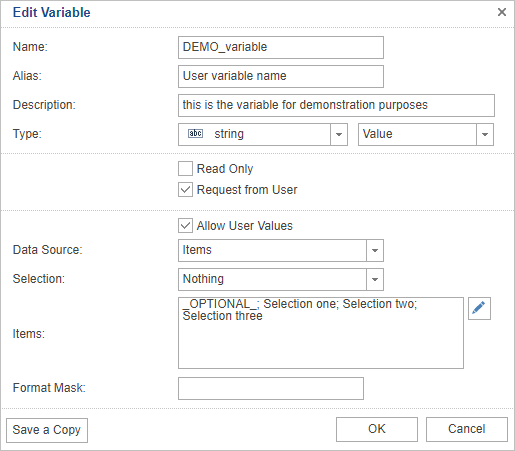
After clicking the Items field or edit icon, Value is left blank in the new Items window.
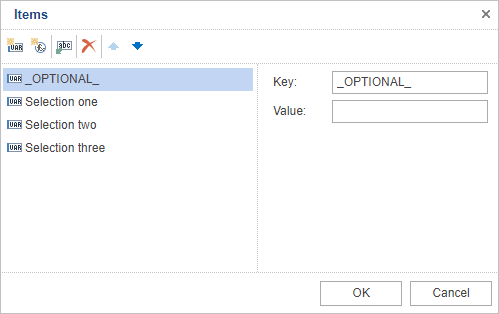
For more details on the other settings for Items, see Select from a custom list of items.
Select from a data column string variable
If the user is offered a list of items fetched from a data source column, then the data fetched from the column should be expanded with an additional record _OPTIONAL_ that is offered for selection.
Here is an example query for the ReportNamesSelect data source that generates the name column. In this example, this is used as the source for the dropdown list a user sees when generating a report:
select '_OPTIONAL_' as name union select name from report order by name asc
The configuration for the related string select variable is as follows:
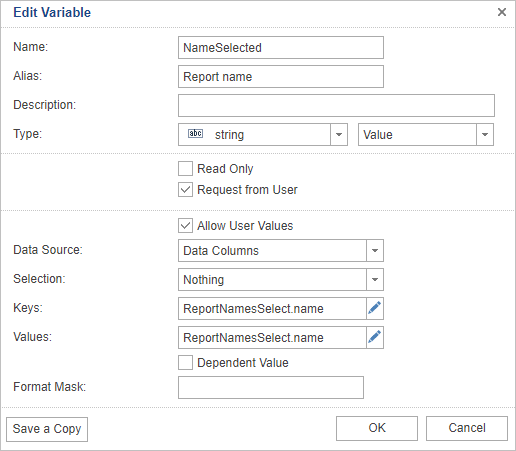
The non-selection is by default represented in the list as - None -.
|
Note
It is also possible to use a different data sources for Keys and Values, as explained in Select from data columns. |
Select from a list of items numeric variable
The configuration for a numeric data type custom items list is very similar, the only difference being that Key has to be numeric. The keyword _OPTIONAL_ is therefore entered in the Value field. The numeric Key related to the _OPTIONAL_ Value will be 0 by default, and will be ignored.