Elsbeth integration scripts
As part of the integration between the CCaaS and Elsbeth products, an audio file needs to be played back to a customer:
- At the end of an abandoned call — PlaybackAudioCallAbandoned script
- After a rebound call is queued — PlaybackAudioReboundQueued script
- If a rebound call is rejected — PlaybackAudioReboundRejected script
These scripts are system-initiated.
As a prerequisite for playback audio to work, you must do the following:
- Select the appropriate tab, depending on your Playback Audio scenario.
- Add a new Playback Audio block. Leave the Audio file property blank. CCaaS takes the URL of the file to play from the campaign parameters configured in CCaaS Admin.
- Connect it with the start block and save the script.
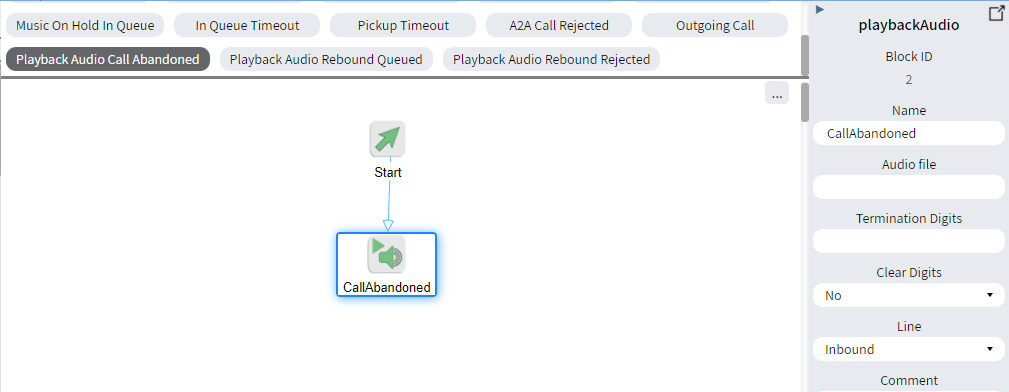
Playback Audio Call Abandoned script
This script is system-initiated and plays back audio to a customer at the end of an abandoned call.
The audio file in the Filename property must match the URL configured in the Audio File URL In Call Abandoned parameter in the CCaaS Admin Campaign properties.
Playback Audio Rebound Queued script
This script is system-initiated and plays back audio to a customer after a rebound call is queued.
The audio file in the Filename property must match the URL configured in the Audio File URL Rebound in queue timeout reject parameter in the CCaaS Admin Campaign properties.
Playback Audio Rebound Rejected script
This script is system-initiated and plays back audio to a customer when a rebound call is rejected.
The audio file in the Filename property must match the URL configured in the Audio File URL Rebound no queueing reject parameter in the CCaaS Admin Campaign properties.