Supervised Transfer

VCS only.
This block redirects a call to another phone number. The difference between Supervised Transfer and Transfer is that the former waits for the outgoing call to be answered or failed. It then allows the call to be re-routed, depending on the result.
|
Properties |
Values |
Description |
|---|---|---|
|
Phone Number |
0-9 * and # |
Any valid phone number to which to redirect the call, for example, +16315551212 By using the + format, the number is location independent. This should be used unless you know all of your VCSs are in one location. If using a variable, add + to the value of the variable, for example, +$NumberDialed$. Note
|
|
Source ID |
String |
Note This information is shown only if the Source display property is missing.
When transferring a call, you can optionally set the source address (CallingPartyNumber) from the script you are using. If this is left blank, the ANI for the gateway is used, if that is not set, the ANI for the tenant is used. This can be either an H323-ID or an E164 number:
All possible values for this property should
be contained in a single string, such as: The source address can be specified as either an H323-ID value denoted by the NAME: prefix, or as an E164 address denoted by the TEL: prefix. You do not have to send both types of source address, but it is legal if needed. However, if not blank, the source address must contain one or the other prefix format. |
|
String |
What to display as a source. This property is also known as CallerID or CallingPartyName. |
|
|
Connect Timeout |
Number |
The number of seconds to
wait for the calling party to answer. If this is exceeded, the
result of No Answer is
returned. |
|
Wave File |
Filename |
Performs an Asynchronous
Play Audio while the transfer is in progress. |
|
Bridge Method
|
Bridge Calls |
Bridges the call control and media stream (the individual calls become a single call). If either party disconnects, the call terminates. Caution For TTS scripts, the transferred call bridges with TTS and the call does not transfer to a new agent. When the agent presses transfer or the transferred call is bridged (whichever happens first), the TTS call disconnects, the agent disconnects, and the transfer monitor moves to the main call (the incoming call). Note The media stream is no longer available in the IVR. |
|
Bridge Media Only |
Parties can communicate with each other, but if one party disconnects, call does not terminate. Note The media stream is no longer available in the IVR. |
|
|
Do not Bridge |
Do not bridge the calls. Note To retain call control in the IVR, set the Bridge Method to Do not Bridge. Add an Answer case to the Supervised Transfer block and connect this case to a Bridge Call block to finally connect the call. Add other cases to the Supervised Transfer block to perform normal IVR actions with the caller, such as play messages or transfer to other destinations. |
|
|
Bridge Media & DTMF |
Parties can communicate with and forward DTMF tones to each other, but if one party disconnects, call does not terminate. Note The media stream is no longer available in the IVR. |
Configure the Supervised Transfer block
- Right-click the block and click Add case. The Transfer dialog appears.
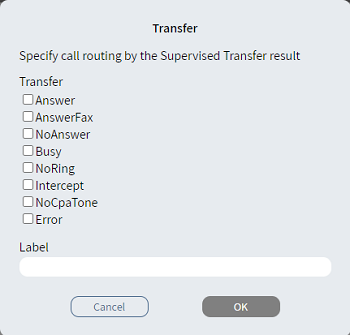
- From the Transfer list, select one or more items.
- Optionally, in Label, type an alternative description.
- Click OK. The Case branch
 appears.
 - Connect the Case branch to the appropriate block in the script. For example, the next block could play "The line appears to be busy. If you want to try again in ten seconds, press one."
- Connect the Else
branch
 to the appropriate
block in the script.
to the appropriate
block in the script.