D
Dictionary
Every data model is defined through its related data Dictionary. The Dictionary is the connection between the data and the reports the data is connected to. The Dictionary and the information contained therein are used by the Report Designer to create relevant reports.
The Dictionary includes:
- Data Sources: Database connections and/or files, as set up when creating the data model
|
Note If on creating a new data model no existing data connection was used or no new one was created, the newly created data model is empty, with no defined Data Sources in the Dictionary. See Creating a new data model for more. |
- Relations: Data on how the data sources relate to each other. See more in Data relations.
- Variables: A list of all the user-defined or system-defined variables in the selected data model. For more, see Variables.
- Functions: A list of all functions available within in the selected data model.
- Resources: A list of all the additional resources in the selected data model, such as uploaded files or images.
All the components of the Dictionary are structured in a tree form similar to folder hierarchy in standard file explorers.
In the top part of the Dictionary there are several menus and contextual tools:
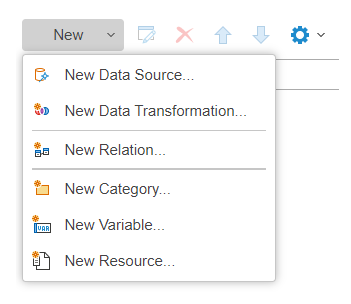
- The New Item dropdown menu provides the following options:
- New Data Source: Lets you define a new source of data (i.e. database connection or data file). See more in Creating a data source.
- New Data Transformation: Used for compiling and/or aggregating existing data from multiple sources into a new temporary data source. Used for report generation, automated for all reports.
|
Note It is possible to prepare the data transformation manually before rendering individual reports in order to simplify report design, filtering, data grouping etc. If a Data Transformation is defined, it can be used for report generation in the same way as all other data sources in a data model. |
- New Relation: Used to bind together data from different data sources into a parent and child relationship. The corresponding categories of the sources should be identified and bound together in order to adequately display, sort and filter data contained in different sources, which is required to render a report. See more in Data relations.
- New Category: Used to group user-defined variables for a more organized overview or easier access. It does not affect the functionality of the data model.
- New Variable: Creates a new value container that can be defined form available data, either through an expression or by the user. It can be defined on the data model level or on the report designer level. When used inside queries, it should be defined on the data model level.
|
Caution Variable parameters can be changed on the report designer level, affecting the relevant connected report. |
- New Resource: Used for uploading data files, such as images, to the Reporting system, which will then be used for report rendering. For example, to place an image, such as a logo, in a report, you would upload it here and drag and drop it into the report.
-
The remaining Dictionary tools are of contextual nature, and are available only when an applicable element from the dictionary is selected. Respectively they are:
- Edit
 : Access the parameters of the selected object.
 - Delete
 : Remove the selected object from the Dictionary.
 - Move Up/Down
 : Change the position of an object inside a relevant structure.