Manage legacy licenses
Allocate legacy licenses to users
Legacy licenses are used to determine how many agents can log on per tenant. The tenant administrator can view the number of available agent licenses added to their contact center by the system administrator.
If the enforcement type is Block, the tenant's logged on agents cannot exceed the number of available licenses.
|
Note Your agents may be prevented from logging on, even when they are within your available licenses limit, if some tenants do not have the Block enforcement type and exceed the number of licenses allocated to them. |
View the legacy Licenses list
- On the navigation pane, click
 Miscellaneous.
 - Click the Licenses tab. The Licenses list appears. For navigation information, see List view and How to search.

View contact center licenses
You can view the agent licenses added to your contact center.
- On the Licenses page, click the Agent - Concurrent license. The License: [Name] dialog appears.
-
- Name — the license name.
- Available —
- Enforcement type — the options are:
- None (default) — allow agent logons above this limit.
- Block — do not allow agent logons above this limit.
- Click OK.
Allocate legacy licenses to agents
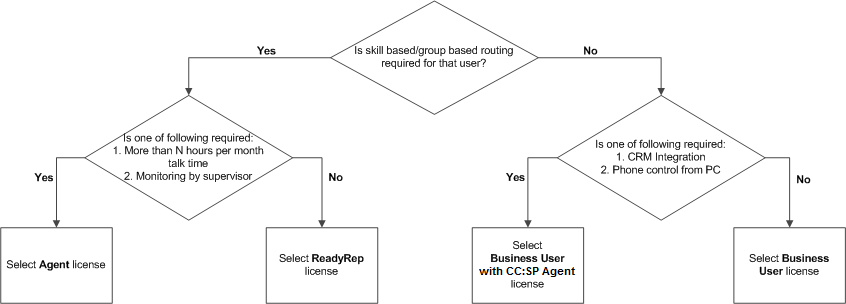
For each agent, select the appropriate license, using the following flow chart as your guide. See Manage personnel parameters.