Working hours
This section contains the following topics:
- Add a new working hours placeholder
- Edit a working hours placeholder
- Change working hours placeholder's permissions profile
- Duplicate a working hours placeholder
- Publish working hours placeholders
- Deactivate or reactivate a working hours placeholder
- Delete inactive working hours placeholders
- Use a different time zone for IVR
- Integrate the Working Hours module with Designer
- Working Hours Activation IVR application
The Working Hours page appears as follows.
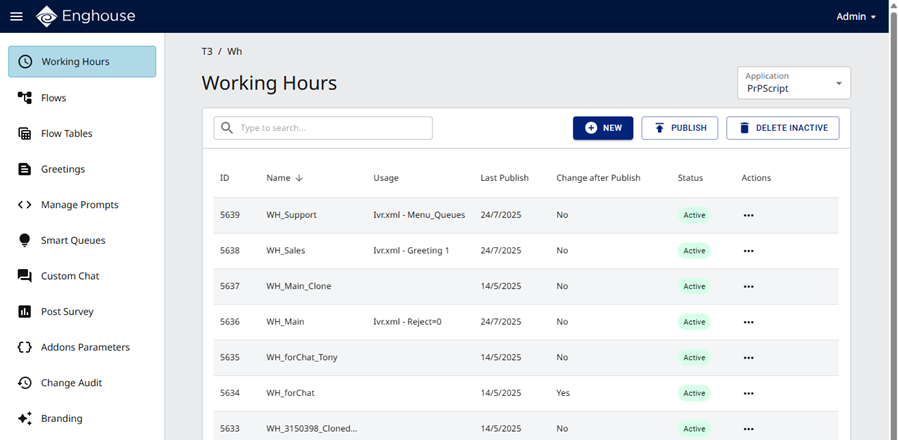
For a description of the default working hours placeholders, see Working hours placeholders.
Overview
|
Note Working hours placeholders may be defined by service providers or tenants. Both types are shown on the Working Hours page. |
This section describes how to configure call treatments for non-working days and non-working hours by day-of-week and special dates calendars. It describes how to use a placeholder to define an event and assign the desired call treatments, and how to assign the event to the Weekdays and Special Dates calendars.
For example, the call center is closed from midnight to 8:00. The supervisors may select the hours and then select a designated afterhours flow for the callers to receive.
The afterhours flow can be any flow defined as a flow placeholder type. Customization of flows is done in the Flows module page introduced earlier. A flow may contain announcements, menus, and blocks. When a flow is customized for its final behavior by the tenant, for example, assign the flow to handle afterhours-calls. With Working Hours module page, you may further define special actions for holidays. For example, a supervisor may create a special announcement for a holiday, such as Independence Day. In terms of authorization, designated supervisors for each group in the tenant have a special permissions profile to make working hours changes for the relevant group(s) so calls landing on different groups may be treated with respect to the group's working hours.
Working Hours can be used as a standalone module by Advanced Developers.